陈志军

物来顺应,未来不迎,当时不杂,既过不恋


  • 首页

  • 分类

  • 归档

  • 标签

  • 搜索

基础脚本

发表于 2018-05-10 | 分类于 Linux | 阅读次数

基础脚本

最近在同事那里学到一个小脚本,感觉要是之前我也会这样写,那我省去多少时间啊,技多不压身啊。

阅读全文 »

nginx 设置prometheus和grafana的反向代理

发表于 2018-05-02 | 分类于 monitor | 阅读次数

nginx 设置promethues和grafana的反向代理

在配置完promethues,和grafana之后,可能需要上生产环境,这个时候如果有下面两种情况,那么就可能需要用到代理;

  1. 端口只开发80,或者8080等特别的几个端口,端口数量有限;
  2. 不希望暴露给外部端口号,使用子路经来区分;eg: http://{ip}/prometheus,http://{ip}/grafana

nginx 配置,监听server的端口为80,然后通过子路径在内部反向代理出去:

1
2
3
4
5
6
7
8
9
10
11
12
13
14
15
16
17
18
19
20
21
22
23
24
server {
listen 127.0.0.1:80;
#server_name localhost;
#charset koi8-r;
#access_log logs/host.access.log main;
location / {
root html;
index index.html index.htm;
# proxy_pass http://127.0.0.1:9090/;
}
location /grafana/ {
proxy_pass http://127.0.0.1:3000/;
}
location /promethues/ {
proxy_pass http://127.0.0.1:9090/prometheus/;
}
#error_page 404 /404.html;
# redirect server error pages to the static page /50x.html
#
error_page 500 502 503 504 /50x.html;
location = /50x.html {
root html;
}
}
阅读全文 »

ubuntu 怎么修改源?

发表于 2018-05-02 | 分类于 ubuntu | 阅读次数

ubuntu 怎么修改源

修改ubuntu的源为国内的源,修改之前首先备份:

1
cp /etc/apt/sources.list /etc/apt/sources.list.backup

修改源列表,选择的是国内的阿里源,vi /etc/apt/sources.list,清空里面内容:dG,使用命令的时候要回到第一行:gg,之后将下面的内容复制到文件中:

1
2
3
4
5
6
7
8
9
10
11
12
13
14
15
16
17
18
19
20
deb-src http://archive.ubuntu.com/ubuntu xenial main restricted #Added by software-properties
deb http://mirrors.aliyun.com/ubuntu/ xenial main restricted
deb-src http://mirrors.aliyun.com/ubuntu/ xenial main restricted multiverse universe #Added by software-properties
deb http://mirrors.aliyun.com/ubuntu/ xenial-updates main restricted
deb-src http://mirrors.aliyun.com/ubuntu/ xenial-updates main restricted multiverse universe #Added by software-properties
deb http://mirrors.aliyun.com/ubuntu/ xenial universe
deb http://mirrors.aliyun.com/ubuntu/ xenial-updates universe
deb http://mirrors.aliyun.com/ubuntu/ xenial multiverse
deb http://mirrors.aliyun.com/ubuntu/ xenial-updates multiverse
deb http://mirrors.aliyun.com/ubuntu/ xenial-backports main restricted universe multiverse
deb-src http://mirrors.aliyun.com/ubuntu/ xenial-backports main restricted universe multiverse #Added by software-properties
deb http://archive.canonical.com/ubuntu xenial partner
deb-src http://archive.canonical.com/ubuntu xenial partner
deb http://mirrors.aliyun.com/ubuntu/ xenial-security main restricted
deb-src http://mirrors.aliyun.com/ubuntu/ xenial-security main restricted multiverse universe #Added by software-properties
deb http://mirrors.aliyun.com/ubuntu/ xenial-security universe
deb [arch=amd64] https://download.daocloud.io/docker/linux/ubuntu xenial stable
# deb-src [arch=amd64] https://download.daocloud.io/docker/linux/ubuntu xenial stable
deb http://mirrors.aliyun.com/ubuntu/ xenial-security multiverse

Rancher 体验

发表于 2018-04-18 | 分类于 Docker | 阅读次数

Rancher 体验

Rancher是一个开源的企业级容器管理平台。花了大概3个小时从零到自己搭建一个能运行的服务,真的容易啊。而且文档很丰富,官方还有中文版。哈~,地址:文档。

安装 Rancher

安装Rancher其实很简单,因为它本身就提供了image,所以只需要在本地安装docker,然后下载镜像,之后再启动就完事了。整个过程非常顺利。唯一一个需要主要的地方是,它需要两台机器。一个作为rancher主节点,一个作为工作节点。所以,如果想体验一下 Rancher 的能力,最好能有两台ip不一样的机器,并且两台都安装了docker,当然也可以用虚拟机。

docker run -d --name rancher -p 8080:8080 --restart=unless-stopped rancher/server:stable

安装完 Rancher 之后,需要配置一下主机。Rancher 做了非常棒的国际化,支持中文。��[笑哭.png]

阅读全文 »

解决 logstash 输出到 Elasticsearch 时指定 document_id

发表于 2018-04-02 | 分类于 elk | 阅读次数

今天使用elk搜集日志的时候想到一个事情,是否可以指定es索引中的document_id。查了资料之后发现还真有这个:

1
2
3
4
5
6
7

elasticsearch {
hosts => [ "localhost:9200" ]
index => "%{[fields][service_name]}-%{+YYYY.MM.dd}"
document_id => "%{@timestamp}"
}

就是在logstash.conf中的output中,设置elasticsearch里面document_id就可以了。就是这么简单。当然我这里是用timestamp做的id,其实可以自己换成一个其它的。
es 对一个 id 添加两次是支持的,里面的字段 version 会加 1。

gitlab 自定义配置 (三)

发表于 2018-04-02 | 分类于 git | 阅读次数

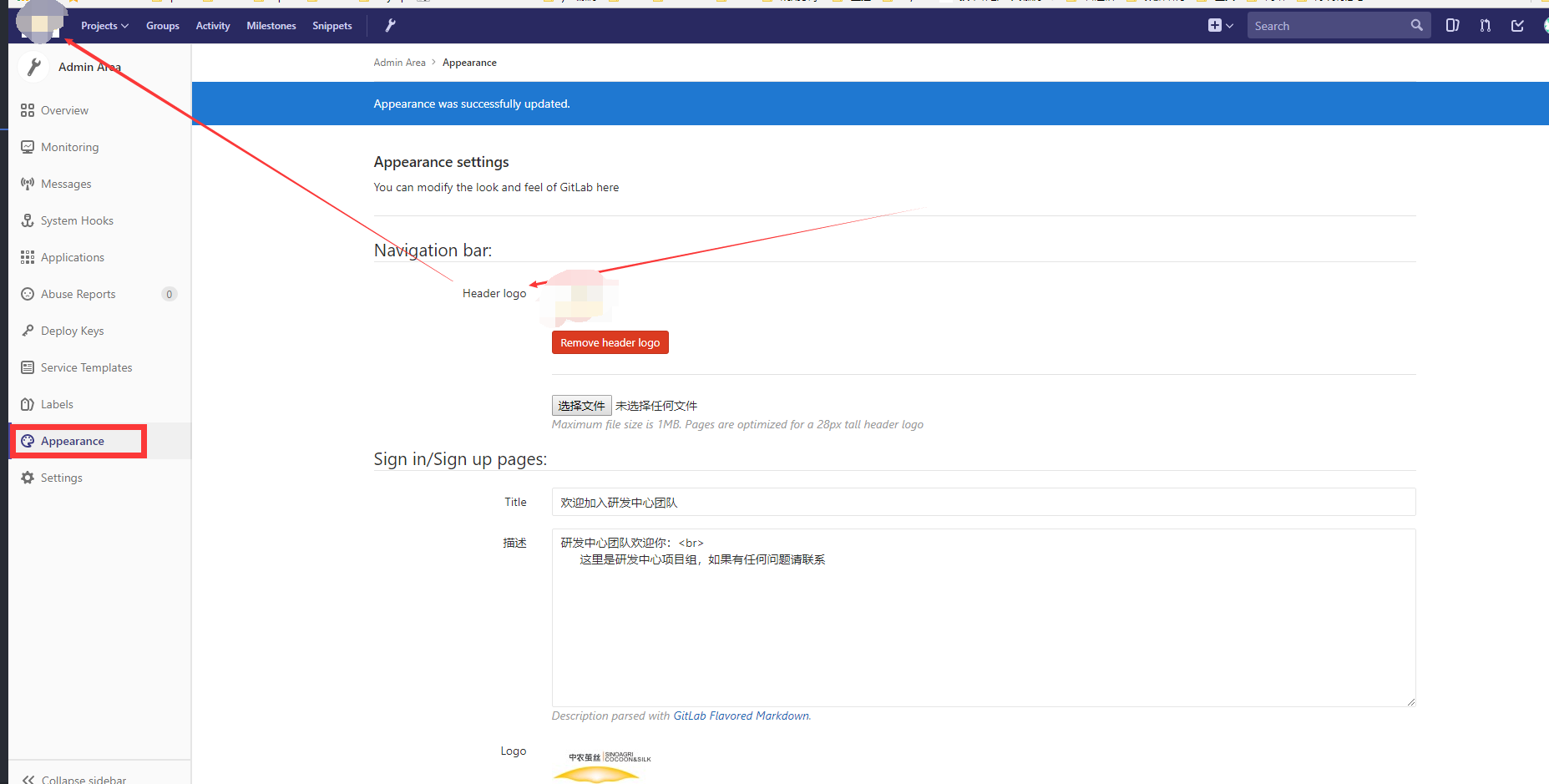
登陆页面与LOGO自定义

2018-04-02-13-53-17

在这里替换之后返回登陆也可以看到:

2018-04-02-13-54-07

阅读全文 »

从 SVN 迁移到 Git (二)

发表于 2018-04-02 | 分类于 git | 阅读次数

从 SVN 导入到 GitLab 仓库中我们只需要下载一个 git-svn 的工具,如果是windows版本的git工具,应该是内置了的;Linux 下使用yum install git-svn。一些操作可以参考git官网的两篇文章:Git-与其他系统-Git-与-Subversion和Git-与其他系统-迁移到-Git。

从实际的svn迁移到git中有两种方式:

1) 最简单最直接的方式,从svn拷下代码,然后上传到gitlab仓库中。

先将svn上的代码拷下来,git svn clone https://192.168.1.12/svn/trade/App_cn/Src/_CJ208_Noe。
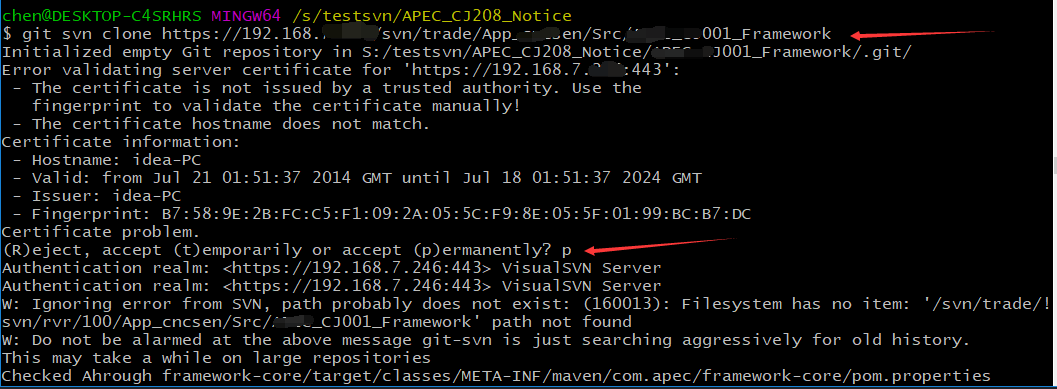
2018-04-02-11-23-02

然后使用git将其推送到gitlab仓库。

1
git remote add origin http://gitlab.xxx.com/xxxgroup/_CJ208_Noe.git
阅读全文 »

gitlab 安装与配置(一)

发表于 2018-03-30 | 分类于 git | 阅读次数

很多公司都是使用的 svn 来管理代码,其实我感觉 git 肯定是未来的潮流。最近闲暇时间,在公司搭建了一个 GitLab ,正好可以记录一下。

gitlab 的搭建环境推荐使用 >=4G 内存

使用 Docker 部署 gitlab

首先需要安装 Docker。推荐使用docker官网的安装方式:Centos 安装docker,如果访问docker官网过于太慢,可以使用DaoCloud下载docker:daocloud 安装docker。有时候下载镜像,有一些比较显而易见的原因,所以可以使用docker镜像加速器。

安装docker之后,下载镜像gitlab/gitlab-ce:latest,之后参照安装文档。

1
2
3
4
5
6
7
8
9
sudo docker run --detach \
--hostname gitlab.example.com \
--publish 443:443 --publish 80:80 --publish 22:22 \
--name gitlab \
--restart always \
--volume /srv/gitlab/config:/etc/gitlab \
--volume /srv/gitlab/logs:/var/log/gitlab \
--volume /srv/gitlab/data:/var/opt/gitlab \
gitlab/gitlab-ce:latest

一个gitlab就搭建好了。**默认的帐号为root**。

阅读全文 »

idea-linux-vim等常用快捷键

发表于 2018-03-26 | 分类于 All | 阅读次数

最近经常看到一些有意思的快捷键,但是又不是经常用到,平常经常用的肯定都能很熟悉了。

idea 常用快捷键

最常用的肯定是 find action :ctrl shift A,这简直就是神器,如果忘记快捷键,尝试使用这个,然后输入快捷键的功能名称就有可能找到相应 功能了。

  1. idea 弹出当前类里面的方法框:ctrl o, 类结构图,file structure:ctrl F12

  2. 跳转: navigate -> back/forward; navigate -> last edit location/next edit location

  3. 最近的文件:recent file/recent changed file ctrl + E
    阅读全文 »

Java 多线程随笔

发表于 2018-03-23 | 分类于 Java | 阅读次数

Java多线程随笔

最近匆匆的看了一下多线程的知识,其实在我们现在的系统中,我只在一个地方用了多线程,异步刷缓存的时候使用到了。其它地方并没有使用。这个可能跟公司局限性业务有关系,毕竟大家都听过一句话,20%的人掌握着80%的财富。而我们服务的就是那20%里面的一部分。

阅读全文 »
1…8910…18

180 日志
41 分类
70 标签
RSS
GitHub GitEE
推荐阅读
  • 陈志军的个人站
© 2017 - 2023 陈志军
由 Hexo 强力驱动
主题 - NexT.Muse